Built for field service businesses

Run your crew.
Not spreadsheets.

Quoting, scheduling, dispatch, offline mobile execution, invoicing, and online payments — in one place. Web for the office. Offline-first mobile app for the field. Free for 14 days. No credit card.

14 days
Free trial — no credit card
Offline
Mobile app works without signal
Stripe
Paid straight to your account
QBO
Two-way QuickBooks sync, line by line

Built for these industries

HVAC Plumbing Electrical Landscaping Pest Control Pool & Spa Concrete + more

Eight modules. One platform.

Every feature is built for the way field service actually runs — from a 3-tech plumbing shop to a 50-tech HVAC operation. Click any card to dive deeper.

In-app messaging & SMS

Dispatcher-to-tech chat, tech-to-tech threads, and per-job customer threads. Twilio-powered SMS for arrival notices and quote/invoice links.

Multi-location inventory

Track parts across vans, warehouses, and job sites. Auto-generated POs when stock dips below threshold. 1099 tracking for subs.

Reports & insights

Revenue by period, job profitability, technician time, expense reports, labor vs. billable analysis. Export to CSV or PDF.

Equipment & service history

Track installed assets by serial number. Per-asset service history surfaces past visits, warranty status, and next due dates.

Recurring service & visits

Set a recurrence rule, generate the visit schedule, and let the system create jobs and invoices on the cadence you define.

Roles & team management

Built-in admin, manager, dispatcher, and technician roles. Custom role labels per tenant — call them whatever you call your crew.

A full day's work,
managed end-to-end

CrewHub360 follows the natural flow of field service work — from the first request through the final QuickBooks sync.

1
Capture the request

Clients submit requests through the Client Hub or you create the lead. Tag the lead source for ROI later.

2
Quote and approve

Build the quote on the web — or on a tech's phone, offline. Send via email or SMS. Client signs digitally through the portal.

3
Schedule the job

Convert the approved quote to a job. Drag-drop visits onto the dispatch board with travel-time and skill awareness.

4
Execute in the field

Techs check in on arrival with GPS, complete checklists, capture photos and signatures, log time — all offline-capable.

5
Invoice, collect, sync

Generate the invoice. Client pays via Stripe Connect (funds go to your account). Invoice and payment sync to QuickBooks Online automatically.

No signal? No problem.

Most field service apps die in a basement, a parking garage, or 20 miles outside town. CrewHub360 Field doesn't. Quote builder, photos, signatures, checklists, time entries — they all work without a data connection and sync when you're back online.

  • Build a full quote with line items and signatures while offline
  • Capture photos, GPS, and timestamps even with the airplane mode on
  • Visit checklists complete locally; reappear synced for the dispatcher
  • Everything's stored right on the phone — built to keep working with no signal

iOS, Android, iPad — same offline foundation

Polished customer reports
from rough field notes

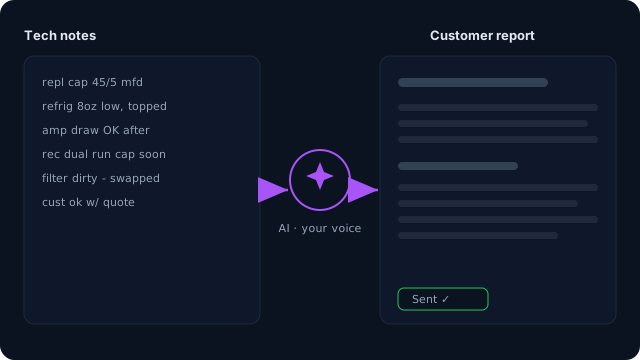
Your tech finishes a job and dictates two sentences. CrewHub360 turns it into a professional, on-brand customer report your client actually wants to read — in seconds, not on the back of a triple-bourbon evening.

  • Trained on your tone via per-tenant voice profiles
  • Generates customer reports, estimate descriptions, and follow-ups
  • Off by default — flip on when you're ready, with a per-action audit log
  • Powered by leading AI. Your data is never used to train it.
Explore AI features
AI turns a technician's rough field notes into a polished, on-brand customer report

Get paid the same day.
Straight to your own account.

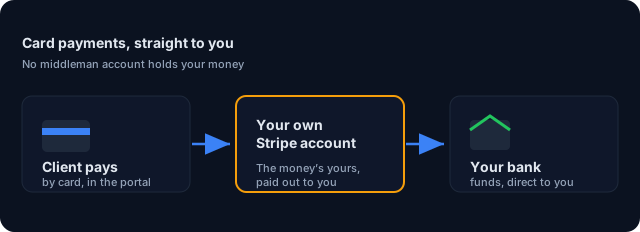
Most field service platforms route your client payments through their account first. Not CrewHub360. Your client's card pays straight into your own Stripe account — the money's yours, and it settles to your bank on Stripe's normal schedule.

  • Funds settle to your bank on Stripe's normal schedule (not ours)
  • Online invoice payment via portal — clients tap a magic link, pay, done
  • Per-payment audit trail with the connected-account ID stamped on each charge
  • Subscription billing for SaaS plans is separate from client-payment routing
See payment details
Client card payments flow directly into your own Stripe account and bank, minus a 0.5% platform fee

What working crews tell us

Quotes captured during onboarding interviews and customer success calls. Names anonymized at the operator's request.

"My techs used to text me back at 9pm with their hours. Now they clock in, finish jobs, and the report is on my desk before they're back at the shop."
HVAC owner — 8 techsNortheast US
"The offline thing isn't a nice-to-have — half my work is in basements and parking decks. Other field apps would silently lose data. CrewHub360 just works."
Plumbing dispatcher — 12 techsMid-Atlantic
"Card payments landing straight in our account is the reason we switched. The money's ours, not theirs. That alone paid for the year."
Electrical contractor — 5 crewSoutheast US

Built for your trade

CrewHub360 is designed around the way field service businesses actually work — whatever you send crews out to do. Tap a card to see how it fits.

Don't see your trade? If you send crews to client locations and invoice for the work, CrewHub360 will fit. Start your free trial →

Simple, honest pricing

Two plans. Every plan starts with a 14-day free trial — no credit card required. Cancel anytime.

Standard
$100/mo
Everything a working crew needs to stay organized in the field

Up to 10 users
Unlimited clients, jobs & visits
Scheduling & dispatch board
Route optimization
Quote builder with digital signatures
Client Hub portal
Invoicing & Stripe Connect
QuickBooks Online sync
GPS time tracking
In-app messaging
Offline-first mobile (iOS, Android, iPad)
Email support
Start Free Trial

Subscription billing via Stripe. Client card payments route through your own connected Stripe account via Stripe Connect; a 0.5% platform fee applies. Cancel anytime.

Common questions

What is CrewHub360?

CrewHub360 is field service management software for HVAC, plumbing, electrical, landscaping, pest control, pool, cleaning and other trades. It covers the full job lifecycle: quoting, scheduling, dispatch, offline mobile execution, invoicing, online payments, and QuickBooks sync.

How long is the free trial?

14 days, full feature access. No credit card required up front. You can cancel anytime — there's no long-term contract.

Does the mobile app work without internet?

Yes. The CrewHub360 Field app for iOS and Android is offline-first. Technicians can build quotes, capture signatures, log time, take photos, and complete checklists without a data connection. Everything syncs automatically when they're back on Wi-Fi or LTE.

Will my client payments go through CrewHub360?

No. We use Stripe Connect, which means your client card payments route directly to your own connected Stripe account. CrewHub360 applies a 0.5% platform fee on these payments, in addition to Stripe's standard processing fees. The money is yours — it lands in your account just like it would if you took card payments through Stripe yourself.

Does CrewHub360 sync with QuickBooks Online?

Yes. Both plans include two-way QuickBooks Online sync for customers, items, invoices, payments, credit memos, bills, taxes, and material costs. Tax codes resolve per-job by service address, and invoices push with descriptive line-level details (qty, unit, price, Job #, PO #).

Which trades does CrewHub360 work for?

Any field service business that sends crews to client locations and invoices for the work. Existing pricebook templates cover plumbing, HVAC, electrical, cleaning, pest control, landscaping, pool service, and general contracting. The platform is trade-agnostic underneath, with role labels and workflows you can customize per industry.

Ready to run a tighter crew?

Start your 14-day free trial today. No credit card. You'll be scheduling jobs and invoicing clients in under 10 minutes.

Start Your 14-Day Free Trial Log In