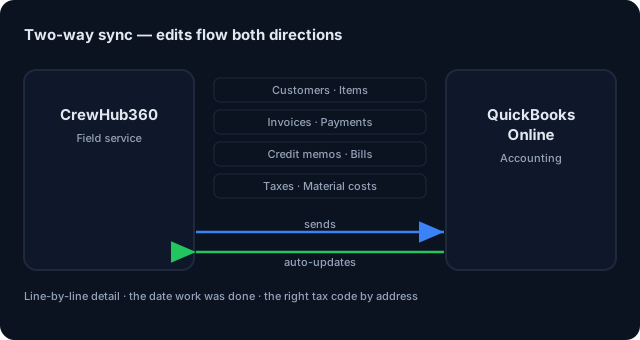
Most field service platforms claim "QuickBooks integration" and what they mean is one-way push of a customer name and a total. Not CrewHub360. We push line items with quantities, unit prices, Job & PO numbers, the date the work was actually done, and tax codes resolved by service address. And when your accountant changes something in QuickBooks, it flows back automatically.
If you're paying a bookkeeper to retype your invoices into QuickBooks, or you're rekeying payments yourself, you're losing 3–4 hours a week per 100 invoices. CrewHub360 closes that loop with a real, line-level, bidirectional sync.
Every line on every invoice pushes to QBO with quantity, unit, unit price, the right item from your price book, a description that includes Job # and PO # if applicable, and the date the work was actually done. Your books reflect what actually happened in the field, not a single rolled-up total.
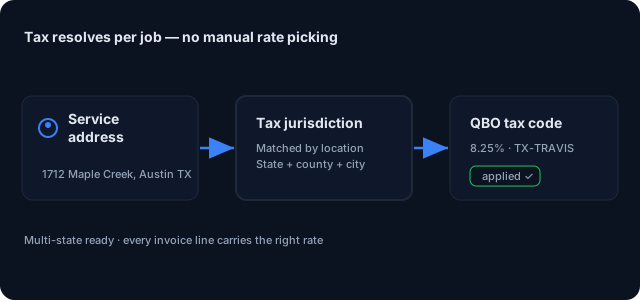
Multi-state operations live and die by tax accuracy. CrewHub360 links each service address to a tax jurisdiction, so the right tax code is applied automatically based on the job's address. When the invoice pushes, the right tax code lands per-line based on where the work was performed — not where you're headquartered.
Sync isn't just invoices. Payments push with the matching payment method and Job-level reference. Credit memos for refunds and adjustments. Bills for vendor expenses. Material costs push when materials are used on a job. If a sync fails it retries on its own and never duplicates anything.
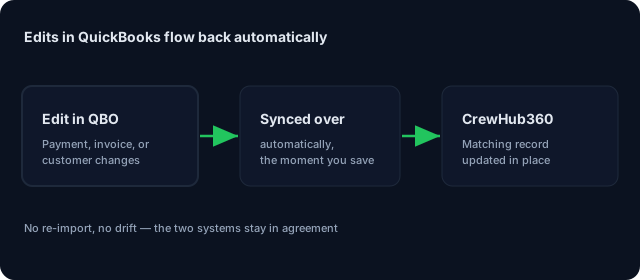
When your accountant changes something in QuickBooks, it flows back automatically and updates the matching CrewHub360 record. Your accountant can fix a typo in QBO and CrewHub360 picks it up. Every sync is logged so you can see exactly what happened — with timestamp, status, and error trail if applicable.
Stripe Connect direct billing. Payments routed to your account, with QBO sync on the same workflow.
Learn more →Time entries, bonuses, and expense reports roll up into payroll periods — exportable to QBO or your payroll provider.
Learn more →Conflict-aware drag-and-drop, route optimization, skill-based dispatch, live tech GPS.
Learn more →Customers, service items, invoices, payments, credit memos, bills, tax codes, and material costs. Every sync is logged so you can see exactly what happened.
Yes. We push changes from CrewHub360 to QBO, and when your accountant changes something in QuickBooks, it flows back automatically. If your accountant edits an invoice in QBO, CrewHub360 picks up the change.
The right tax code is applied automatically based on the job's address. The right tax code lands on the right invoice line based on where the work was done — important for multi-state operators.
Yes. Each line pushes with quantity, unit, price, the Job # and PO # if applicable, and the date the work was actually done. No more generic 'labor' or 'materials' lines — your accountant sees exactly what was billed and when it happened.
There's a simple setup step for matching your CrewHub360 payment methods to your QuickBooks payment methods. When a payment posts to QBO, the matching payment method is attached automatically.
Every sync is logged so you can see exactly what happened. If a sync fails it retries on its own and never duplicates anything. You can view sync history per record and manually retry whenever you like.
14-day free trial. Connect QBO whenever you're ready — included on every plan, full access from day one.
Start Your Free Trial