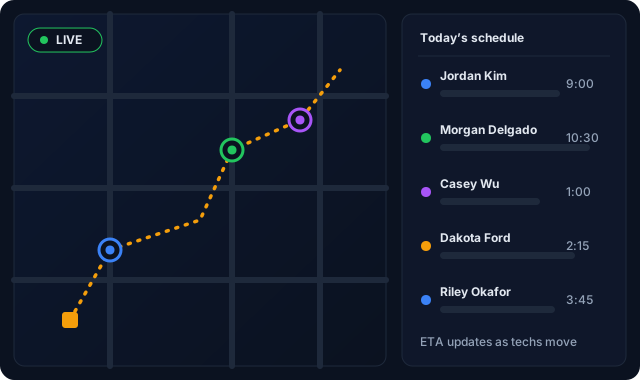
A drag-and-drop dispatch board that won't let you double-book, won't let you assign an uncertified tech to a permitted job, and tells you when a 9am won't make it to a 10am because of drive time. Plus live GPS so you can see the whole crew at a glance.
Below 3 techs you can run a paper calendar. Above 3 you start losing time to "who can take this?" and "where is so-and-so?" CrewHub360's dispatch board is built for the operational reality of running a crew that's spread across town all day.
A drag-and-drop dispatch board with a resource grid showing each tech's day. Drag a visit, drop it. The board checks for time overlaps, PTO blocks, and travel time before letting you commit. Want to override? Yes — but it's logged with the reason and who did it.
Track each tech's certifications, licenses, and expiry dates in their own record. Tag each job with required skills. The dispatch board filters and warns automatically — no more accidentally assigning a journeyman job to an apprentice, or a refrigerant repair to someone whose 608 lapsed last quarter.
Click "Optimize day" and CrewHub360 calls Google Maps to compute the most efficient sequence of stops for each tech, depot to depot, so the tech sees their day's stops in the right order. And if Google Maps is ever unreachable, it still gives you a sensible order.
The mobile app pushes location at intervals while a tech is clocked in. Dispatchers see live positions on a map alongside the schedule. Use it to assign the next emergency call, to give a customer an accurate ETA, or to confirm a time entry against actual location.
Techs see their assigned schedule, check in/out, complete checklists — all without signal.
Learn more →Clients see upcoming visits and request service through the magic-link portal.
Learn more →Time entries from dispatched visits roll up into payroll periods automatically.
Learn more →When you drag a visit onto a tech's schedule, the dispatch board checks (1) does this visit overlap an existing one, (2) is the tech available (no PTO, sick, training block), and (3) is there enough travel time from the previous job's location? It warns before letting you double-book, and if you override the warning it's logged with the reason and who did it.
Each job can require certain skills (EPA 608 for HVAC refrigerant, journeyman license for electrical permit work, etc.). Each tech has a record of certs and expiry dates. The dispatch board only shows techs who match — and warns you if you try to assign someone unqualified.
Yes. We use Google Maps to compute the most efficient sequence of stops for each tech's day. You can run optimization manually or schedule it to recompute overnight, and if Google Maps is ever unreachable, it still gives you a sensible order.
Dispatchers see each clocked-in tech's last-known location on a map view. Used to (1) assign the next job to whoever is closest, (2) tell customers an accurate arrival ETA, and (3) verify time entries against actual location for shift-based pay. Background tracking is strictly tied to clocked-in state and ends when the tech clocks out.
Yes. Block date ranges with a category (PTO, sick, training, holiday) and the dispatch board treats those windows as unavailable for scheduling.
Yes — with automated reminders. When a tech is marked en route, CrewHub360 can send an email or SMS to the client with the tech's name and ETA. The message wording and timing are up to you.
Free trial. No credit card. Drag-and-drop dispatch board, route optimization, and live tech GPS included on every plan.
Start Your Free Trial