Time + bonuses + expenses, locked & ready

Bonus & payroll math, automatic.

Stop calculating revenue bonuses on the back of a napkin. Define the structure once. CrewHub360 watches the time entries, the closed-job revenue, and the production volume, and rolls everything into a clean, locked payroll period at the end of the cycle. Export to your payroll provider and you're done.

Owners running a real bonus or commission program

If you're paying production bonuses, revenue commissions, or hybrid pay and you're spending a Saturday every two weeks calculating it from spreadsheets, this is for you. Define the rules once, then trust the period rollup.

Owners Bookkeepers Field technicians

GPS time tracking from any device

Techs clock in on the mobile app, on the iPad, or on the web — anywhere. Each clock-in records the GPS coordinates and timestamp; the dispatch board sees actual-vs-scheduled time so you know if a "30 minute service call" actually took an hour. The mobile app keeps the GPS record locally if there's no signal and syncs when reconnected.

  • Multi-device clock in / clock out
  • GPS coordinates captured at every state change
  • Actual-vs-scheduled time visible to dispatchers
  • Every entry shows how it was recorded: typed in by hand or captured by GPS
CrewHub360 mobile app GPS time clock

Bonus structures that match how you actually pay

Tiered revenue bonuses, per-job production bonuses, commission percentages, hybrid models — define the rule once in the bonus structure builder, attach it to a role or a tech, and the period rollup computes the bonus automatically based on actual job and time data.

  • Tier-based revenue bonuses (e.g., 10% over $40k/mo)
  • Production bonuses (per job, per install, per sqft)
  • Commission % on closed quotes
  • Per-tech, per-role, or per-workspace defaults
CrewHub360 bonus structure builder
Bonus-structure builder — define once, applied automatically

Locked payroll periods that roll up everything

Define your cadence — weekly, biweekly, semi-monthly, monthly. At the end of each period, lock it. Time entries, expenses, bonuses, and overtime calculations all freeze. Late edits land in the next period. Standard accounting practice, fully audit-trailed.

  • Weekly / biweekly / semi-monthly / monthly cadences
  • Lock state freezes time, expenses, bonuses
  • Late edits → next period (audit log preserves history)
  • Per-tech period summary visible in their profile
CrewHub360 locked payroll period with per-tech rollup
Payroll period locks — bundle everything, freeze, export

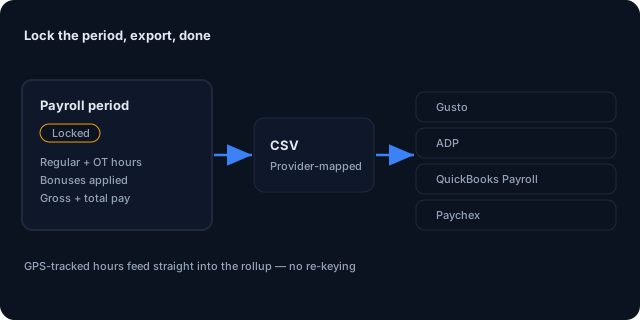
Export to Gusto, ADP, QBO Payroll, Paychex

The locked period exports to a CSV with configurable columns that match most major payroll providers. For QuickBooks Payroll specifically, time entries can sync alongside the rest of the QBO bidirectional sync.

  • CSV export with configurable column mapping
  • Gusto / ADP / QBO Payroll / Paychex column presets
  • Per-period file with one row per tech
  • Re-export anytime — period is read-only but downloadable
Payroll period exports to a provider-mapped CSV for Gusto, ADP, QBO Payroll or Paychex

Round out the back office

Payroll & bonuses: common questions

How does GPS time tracking work?

Field techs check in and out of visits from any device. Each clock-in records GPS coordinates and timestamp. Dispatchers see actual-vs-scheduled time and can verify time entries against location for shift-based pay. Background tracking is strictly tied to clocked-in state.

What bonus structures are supported?

Tier-based revenue bonuses (hit $X in monthly revenue, get $Y), production bonuses (per-job, per-square-foot, per-install), commission percentages on closed quotes, and ad-hoc one-time bonuses. Configurable per workspace, per role, or per individual tech.

What's a payroll period?

A locked date range (weekly, biweekly, semi-monthly, or monthly) that bundles every time entry, expense, and bonus for export. Once locked, the period is read-only — late edits land in the next period. Standard accounting practice.

Can I export to my payroll provider?

Yes — CSV export with configurable column mapping covers most providers (Gusto, ADP, QuickBooks Payroll, Paychex). For QBO Payroll specifically, time entries roll up alongside the rest of the QBO sync.

Does it handle differing pay rates per role?

Yes. Each tech has an hourly pay rate set on their profile. Roles, departments, and projects can override it. Time entries inherit the rate at clock-in time, so historical entries don't shift if you raise rates later.

How are expenses captured?

Job-level expense entries (materials, fuel, parking, tolls) are logged against jobs. Per-period rollups attribute expenses to the period when they were incurred. Reimbursable expenses can be flagged for inclusion in the next payroll cycle.

End your payroll Saturdays

14-day free trial. Pro plan unlocks bonus structures, payroll periods, and CSV export.

Start Your Free Trial