Card payments straight to your bank

Get paid the same day. Straight to your own account.

Most field service platforms route your client payments through their account first. CrewHub360 doesn't. Your client's card pays straight into your own Stripe account. You're the one getting paid directly — it's your account and your money — and funds land in your bank on Stripe's normal schedule.

Owners and accountants who want every dollar to land in their account

If you've been on a platform that holds your funds for "review" before releasing them, you'll feel the difference instantly. The money goes straight to your account, not ours — exactly as if your customer had paid you direct.

Business owners Accountants Office managers

Your money lands in your account, not ours

Every charge runs on your own Stripe account. The funds, the customer record, the dispute risk — all of it stays on your side of the line.

  • You're the one getting paid directly on every charge — it's your account and your money
  • Funds land in your bank on Stripe's normal schedule (we don't hold them up)
  • Chargebacks and disputes are between you and Stripe
  • Every charge is stamped with your account, so you have a clean record of each payment
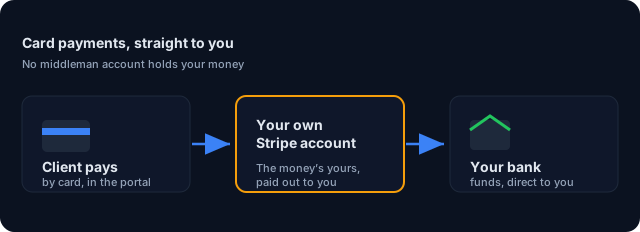
Card payments flow straight from your customer's card into your own bank account

Online invoice pay built into the Client Hub

Email an invoice. Your client gets a magic-link to the Client Hub portal — no app, no password. They view the invoice, tap "Pay now", enter card details, done. The payment lands in your Stripe account immediately and is marked against the invoice the moment the card payment goes through.

  • Client gets email or SMS with magic link
  • One-tap pay on the invoice page
  • Apple Pay and Google Pay if supported on your account
  • Payment receipt auto-emails the client
Client portal invoice with a one-tap Pay button
Magic-link invoice pay — no login, no friction

Deposits, recurring billing, and credit memos

Big jobs need deposits. Recurring service contracts need monthly billing. Mistakes need credit memos. CrewHub360 handles all of it through your own Stripe account, with the matching records flowing to QuickBooks Online if you have it connected.

  • Per-quote deposit (fixed amount or percentage) at approval
  • Recurring invoices for service contracts (monthly, quarterly, annual)
  • Credit memos for refunds and adjustments — pushed to QBO automatically
  • An invoice is only ever marked paid once the card payment actually goes through — never before
CrewHub360 invoice detail with line items and totals
Deposits, recurring & credit memos — all routed direct to you

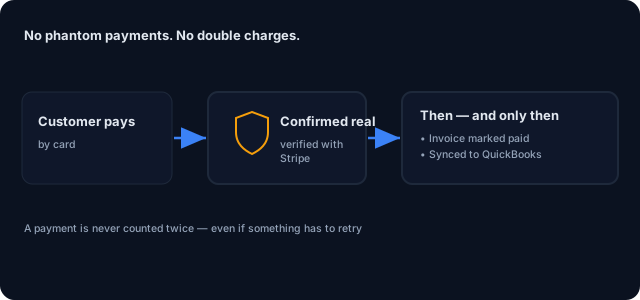
Every payment is verified before it counts

Every payment is verified as genuine before it's ever marked paid — no phantom or double charges. Every outcome (paid, failed, refunded) is recorded before anything else happens.

  • Every payment is confirmed genuine before it's marked paid
  • No phantom or double charges, even if a payment is sent twice
  • A record of every payment is kept
  • The invoice is only marked paid, and pushed to QuickBooks, once the card payment actually goes through
A card payment is confirmed as genuine before the invoice is marked paid — no phantom or double charges

Round out the office-to-bank workflow

Getting paid: common questions

How does CrewHub360 handle my card payments?

Your customer's card pays straight into your own Stripe account, not through CrewHub360's account. You're the one getting paid directly — it's your account and your money — you receive funds on Stripe's normal schedule, and you own any chargeback risk. CrewHub360 sets up the connection but never holds your money.

What does CrewHub360 charge in fees on client payments?

CrewHub360 applies a platform fee of 0.5% per transaction by default on card payments. That's in addition to Stripe's standard processing fee (currently 2.9% + 30¢ for cards), which you pay directly to Stripe. The platform fee is collected automatically through Stripe at the time of the charge.

How fast do I get paid?

On Stripe's normal settlement schedule. New Stripe accounts typically settle in 2 business days; established accounts can be 1 day or instant on supported banks. We don't add delay because we're not in the money flow.

How does my client actually pay?

They get an email or text with a magic-link to the invoice in your Client Hub portal. They tap, see the invoice, click 'Pay now', enter card details once, and the payment lands in your Stripe account. No login required. Bank transfers and saved cards are supported on your account too.

Can I require a deposit on quotes?

Yes. Per-quote deposit fields (fixed amount or percentage) collect the deposit when the client approves the quote. The deposit pays into your Stripe account and is automatically applied to the resulting invoice when the job completes.

What about chargebacks and disputes?

Chargebacks are handled directly between you and Stripe — they hit your own account. We don't intercept disputes or hold disputed funds. CrewHub360 logs every payment against your account so you have a clean record.

Connect your Stripe account in 5 minutes

14-day free trial. No credit card required. Connect Stripe whenever you're ready — you don't need it to evaluate the rest of the platform.

Start Your Free Trial