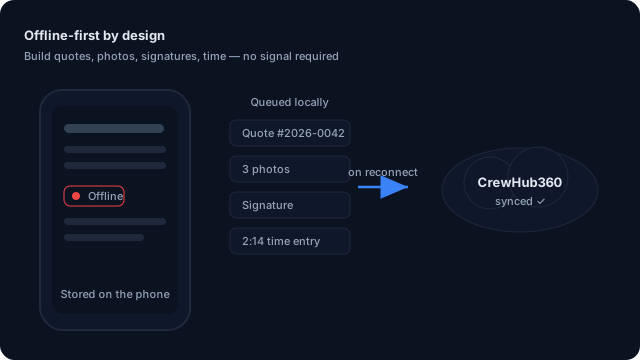
Offline-first by design

The field service app that works without signal.

Most field apps die in basements, parking decks, and back roads. CrewHub360 Field doesn't. Build full quotes, capture signatures, log time, snap photos, and finish checklists offline — then sync automatically when your tech is back on Wi-Fi or LTE.

Service businesses that don't always have signal

HVAC techs in mechanical rooms. Plumbers in basements. Electrical crews in commercial back-of-house. Landscapers on rural properties. Pest control techs in attics. Anywhere LTE goes to die.

Field technicians Dispatchers Owners

Build a full quote on-site, no signal required

Your tech is on a roof at 2pm. The customer asks for a quote. Most apps say "you have to be online." CrewHub360 Field doesn't. The full pricebook syncs to the device at login, so the quote builder works against local data — line items, taxes, deposits, signatures, the works.

  • Service catalog cached on first login (no separate "download" step)
  • Add line items, adjust quantities, apply markups all offline
  • Capture signature on the device's screen
  • Submit when reconnected — the job is already on the dispatch board
CrewHub360 mobile app job detail with line items, built on-site

Photos, signatures, GPS — all captured locally first

The phone camera and GPS chip work without cell. CrewHub360 Field stores every photo and location stamp right on the device. When the tech is back on Wi-Fi, photos upload to secure cloud storage in the background, and the app keeps retrying on its own until they're all up.

  • Photos saved with the location and time they were taken
  • Signatures captured and saved right on the device
  • GPS clock in / clock out works on airplane mode
  • Photos upload in the background and keep retrying — tech doesn't babysit it
CrewHub360 mobile app photo capture with photo-type tagging

Visit checklists that actually work in a basement

Templated checklists expand on every visit (HVAC PM, plumbing rough-in, pool chemistry, whatever you run). Each check, note, and photo is captured locally. Dispatchers see everything once the device reconnects — no messy phone calls, no "did you actually do step 4?"

  • Reusable checklist templates per service type
  • Each item supports text, photo, signature, or yes/no
  • Mobile-optimized — big tap targets, gloves friendly
  • Marked complete locally, synced to the office automatically
CrewHub360 mobile app visit checklist

Built to work where your techs work

We didn't bolt offline onto an app that needs the internet to run. CrewHub360 Field is offline-first from the ground up — a proven foundation that handles millions of records without breaking a sweat. Syncing is quick, smart, and never gets in your tech's way.

  • Everything stored right on the phone, so it opens instantly
  • Only your new changes get sent, so syncing is fast and light on data
  • If a sync gets cut off, it picks right back up — nothing lost
  • Stays under 50 MB on the phone even at thousands of jobs
The app works offline on the phone and syncs automatically when back online

Round out the field-day workflow

Offline mode: common questions

How does offline mode work?

The CrewHub360 Field app keeps everything your tech needs stored right on the phone. When the phone loses signal, the app keeps working — quotes, photos, signatures, time entries, and checklists all save on the device. When the phone reconnects to Wi-Fi or LTE, everything syncs automatically in the background.

What happens if two people edit the same record offline?

Every edit is time-stamped and applied in the order it happened. For job details like status, the most recent change wins; line items and time entries only ever get added, never overwritten, so clashes are rare. If anything's unclear, it gets flagged for the dispatcher to sort out.

Will photos and signatures upload reliably?

Yes. Photos are saved on the phone and uploaded to secure cloud storage as soon as there's enough signal. If an upload doesn't go through, the app keeps trying on its own — your tech doesn't have to babysit it.

Does GPS still work offline?

Yes. The phone's GPS chip works without cell signal. The app records location stamps locally on clock in / clock out / status changes and syncs them when reconnected.

Which devices are supported?

iOS 15+ and Android 9+. It's a native iOS and Android app. There's an iPad-optimized layout for techs using tablets in the truck.

How much space does it use on the phone?

For a typical workspace, the app stays under 50 MB on the phone even with thousands of jobs and your full service catalog synced. Photos are stored separately on the device and can be cleared without losing any job data.

Try the offline app for 14 days

Full feature access. No credit card. Available on iOS, Android, and iPad.