Your tech finishes a job and dictates two sentences. CrewHub360 turns it into a professional, on-brand customer report your client actually wants to read — in seconds. Your own voice profile keeps the output sounding like your shop, not like AI.
If your techs hate writing customer-facing reports, your reports look like texts, or your office staff is rewriting them at end of day, AI for technicians is built for you. The output is always yours to review and edit before sending.
The tech types or dictates a few sentences after the job. Tap "Generate report." A polished, jargon-light customer-facing summary appears, ready to review, edit, and send. Your client sees what was wrong, what you did, and what to expect next — in plain English.
"Replaced compressor cap, system back to spec at 410A 145 PSI head"
"Replaced a faulty start capacitor on your AC system. Pressures and refrigerant levels are now back within manufacturer spec — your system is running normally and you should notice cooler air at the registers within an hour."
Build a quote from line items in your pricebook. Tap "Generate description." The AI writes a clear, benefit-led explanation of the work for your customer. No vague "labor and materials" — your customer sees what they're paying for and why it matters.
The default voice is professional and warm. Want it more casual? More formal? Want a specific signoff line? Want it tuned for the way your industry actually talks? Your account has a voice profile with settings for tone, formality, signoff, and an option to learn from sample text you paste in.
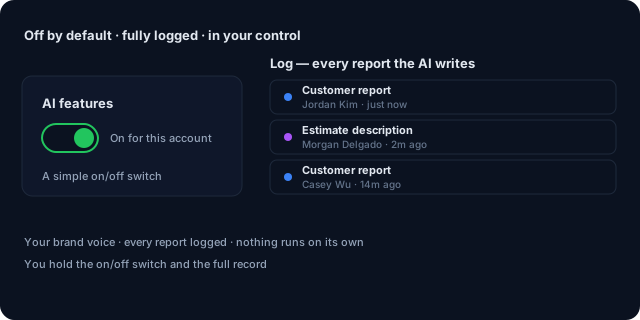
AI has a simple on/off switch for your account and ships off by default. Flip it on when you're ready. Every report and estimate the AI writes is logged so you (and we) can see exactly what's been generated. Flip the switch off and it's gone immediately.
Quote builder, signatures, photos, time tracking — all without signal. AI generation queues until reconnected.
Learn more →Magic-link access to quotes, invoices, equipment, and upcoming visits. No password, no app download.
Learn more →Conflict-aware drag-and-drop, skill-based dispatch, route optimization, live tech GPS on the dispatch board.
Learn more →We use a leading AI built into the product. Every AI request is logged so you have a full record.
No. Your business data is never used to train the AI. The only thing sent to the AI is the specific notes for the report you're generating — nothing else, and never for training.
Your account has a voice profile with settings for tone, formality, industry, and signoff. You can also paste a few sample paragraphs you've written and it picks up your style (formal vs casual, technical vs plain, warm vs neutral). Every report and estimate follows that style so the output sounds like your shop, not generic AI.
Yes. A simple on/off switch for AI on each account, off by default. Flip it on, and Generate buttons appear next to the relevant fields. Flip it off, and they disappear. Your record of what was generated is kept either way.
Customer reports from technician notes, estimate descriptions from line items, and follow-up communication drafts. The mobile app does the same, so techs can produce a customer report from the field after a job.
AI is included on the Pro plan. There's no extra charge per report or estimate — it's covered. Heavy outliers may be flagged but no individual account has hit our threshold to date.
Pro plan trial. Full feature access. AI ships off by default — flip it on when you're ready.
Start Your Free Trial